Midterm Study Guide
[!links] COMP 380 MOCCOMP 380 MOC\[!links\] School Notes Spring 26 MOC Class Notes cn380_Design_2026-03-23 Midterm Study Midterm Study Guide Midterm Practice Problems Midterm Practice ProblemsMidterm Practice Problems\[!links\] COMP 380 MOC Midterm Study Guide Practice Problems 1. a) Develop a complete use case (text) Develop a complete use case (text) for “I as a borrower should be able to borrow a book from the CSUN library via online library management”. You must present your solution in the exact format of the use case template discussed in class. Note that this problem does not ask you to draw the UML use case diagram. Only give use case (text). \[!note\] * Use case name: BorrowBookOnline * Prima
Study Guide
Mid exam is based on lecture slides, handouts, articles on Canvas, textbook chapters and Appendix 1. Lookup Canvas -> Modules -> Get started here -> Detailed Course schedule for reading.
1. Introduction (Modules: Topic 1)
Describe the nature of software.
- Developed over time; does not wear out like hardware does but needs to be continually maintained
What is the motivation for embracing modern software engineering practices?
- To reduce maintenance cost, avoid pitfalls of past software projects, overall make implementation & maintenance easier
2. Software Process (Modules: Topic 2, 3)
Understand various process activities: Requirements, Specification, Design, Implementation/Integration, Testing, Maintenance and Retirement.
| Process | Meaning |
|---|---|
| Requirements | Clients outline the product as they conceptualize it. |
| Operation REQ | functions of the software |
| NON-operational | Resources (time, cost, hardware, security, performance, etc…) |
| Specification | A phase where the agreement between developer & client is drawn up based on the requirements. |
| The agreement describes: functionality, list of constraints the product must satisfy, functional specification, contract between client & developer | |
| Design | Product blueprint from all reqs, detail about software data structs, arch, interfaces, algos, components, to implement UI & Component level design. |
| Impl/Int | Translate the components into a programming language & integrate with deployment. |
| Testing | Unit testing, integration testing, (req) validation testing. |
| Maintenance | Changes made after delivery Corrective (issues/bugs) Preventative (avoid future issues) Perfective (improvements/enhancements) Adaptive (to other platforms) |
What different process models were discussed in class? For each model, understand its characteristics, advantages and disadvantages. Which process model to use in what scenario?
a. Waterfall model
- Linear/sequential, one dir (no going back), only applicable really to very large scale gov projects
- Problems: real projects rarely linear, difficult customer state all reqs at start & need wait till all done & major mistakes not found
[!inline] Waterfall model
b. Rapid Prototyping Model
- Follows evolutionary and iterative approach, used when requirements aren’t well understood. Must be developed quickly, only applicable for small scale projects.
- Problems: stakeholders see working version not backend quality & longterm architecture, temp bad choices could end up final
- Best for when reqs are unclear, helps determine dir, small sites and apps
c. Incremental models
- Incremental development approach slices product based on requirements into fully working increments – each increment builds on top of existing related functionality.
- Requirements are well understood, linear workflow (i.e. sequential) within an increment and is staggered between increments; iterative in nature; Useful when staffing is too short for full-scale development.
- Iterative development is when teams gradually build up features/functions but don’t wait till each of these is complete before releasing; they release a basic version of each feature and add to the feature in subsequent iterative releases usually based on feedback from basic release.
d. Spiral Model
- Hybrid prototyping/linear, milestones per (r)evolution, adjustments from customer feedback, post-release support, rapid dev
- Realistic for large-scale projects, involves considerable risk assessment, good for experimental/cutting edge/research projects
- Problem: No single solid plan to follow by design (managers hate this one trick)
e. Unified Model (Inception, elaboration, Construction and Transition)
- A use-case driven, architecture-centric, iterative, and incremental software process closely aligned with UML to model and develop object-oriented system iteratively and incrementally.
- Phases:
- Inception: reqs & specification (basic outline)
- Elaboration: specification & design (elaborate more with design to support it; use cases)
- Construction: Actual implementation of use cases from earlier phases
- Transition: Beta testing, user feedback reports, documentation, at conclusion of this phase, the software increments because of a usable release.
- Problem: Use cases can be imprecise, overlapping phases messy
f. Agile Development and XP, Scrum
- Agile manifesto
- Individuals/interactions > processes/tools
- Working software > comprehensive docs
- Customer collaboration > contract negotiation
- Responding to change > following a plan
- XP (Extreme Programming):
- Spike solutions solve spike problems, requires prototyping and review to solve
- Continuous integration gets new features running as fast as possible, tested against the automated tests, integrated with other developers’ work at once, allows new features to gather useful feedback.
- System metaphors are helpful to identify abstractions and keep code simple and understandable to all, especially stakeholders. Metaphors allow more specific and advanced terms to be simplified for everyone to understand with examples such as simplifying a file data structure to a tree or a browser process to a stream.
- Creating unit tests before fixing a bug ensures that the bug is understood, repeatable, and covered for the future. This is important as repeat bugs can occur where the same bug reappears for various reasons, allowing an existing test to flag it automatically where a dev might not realize an issue was introduced by changing something elsewhere. Additionally, this is best done before fixing a bug as it can help you to fix the bug and developers are much less likely to create tests after fixing the issue.
- XP is best used when the team size is small (less than 12) and people involved are local or at least same time-zone. Riskier or less defined projects and those with tight deadlines are better suited to XP due to its underlying agile methods. XP should be used when the platform allows frequent ease of testing.
- XP is a lot more defined as to what methods you’ve got to use (ex user stories, CRC cards, spike solutions) whereas Scrum is more flexible in the details used so long as it lines up with the agile principles.
3. Requirements Engineering and Modeling
- What is a use case? Develop a use case for a given problem based on the use case template as discussed in class. EXAMPLE
- Develop UML Use case diagram from a given system description. Create sub diagrams as needed. Understand various relationships between uses cases:
<<uses>>or<<includes>>,<<extends>> - Develop CRC Card design from a given system description. Why should you match the collaborator(s) to a specific responsibility?
- Understand data flow diagram, its components, data dictionary.
- What is a boundary class, control class, and interface class?
- Develop a state transition diagram for a given problem.
- How is a sequence diagram and swim lane diagram useful?
UML (use case diagram): user stories, actors, relationship connection types CRC (cards): class, super class, subclass, collaborators, knows, does UML (class diagram): class, knows, does, types, access modifiers, connections (can be separate)
4. UML class diagram for a small to medium size software project.
Advanced UML Class diagrams
Dependencies / Association / Aggregation / Composition / Realization / Generalization; Depends on / works-with, has-a, implements-a, is-a relationships between classes
[!inline]+ Table
Construct Description Syntax Dependency “Works with” / ”depends on” A has a local variable of BA doesnt store attr refs to B B A
Association “Has a” / ”is part of”A stores B A’s constructor takes BA doesnt create an instance of B B A
Aggregation "Creates a" / "is part of" / “shares” A creates & has B A aggregates BB is publicly accessible outside A B A
Composition "Creates a" / "is part of" A creates & has B A composes BB is not public/accessible outside A B A
Realization/Implementation “Interfaces” / “implements” / “does” A implements B B A
Generalization “Is a” / “kind of” / “extends”Super/Subclass | parent/child classA is the parent of B B extends A B A
Multiplicities, labels, access modifier, data type, method parameter, return type; Representing static members vs. instance members. Access modifiers; Representing interfaces, abstract classes, and enumerations in UML
[!inline]+ Tables
Indicator Meaning 0..1 0 or 1 1 Only 1 0..* 0 or more 1..* 1 or more n Only $n$ (where $n > 1$) 0..n 0 to $n$ (where $n > 1$) 1..n 1 to $n$ (where $n > 1$)
Access Modifiers +Public-Private#Protected~Package/InternalStaticFINAL
Abstraction <<abstract>><<interface>><<external>>
Is-a relationship vs type attribute, when would you prefer one over the other?
In an is-a relationship, when would you prefer an abstract parent over a concrete parent?
When would you prefer implements-a over is-a relationship?
Different levels of details displayed in UML Class diagram at different stages of development
You should be able to take a general description of a system and develop a UML class diagram
You should be able to read a UML class diagram and develop an implementation of it
5. Design Modeling
Understand the concepts of Abstraction, Modularity, Information Hiding, and Functional Independence
Understand the Data Design Elements discussed in class
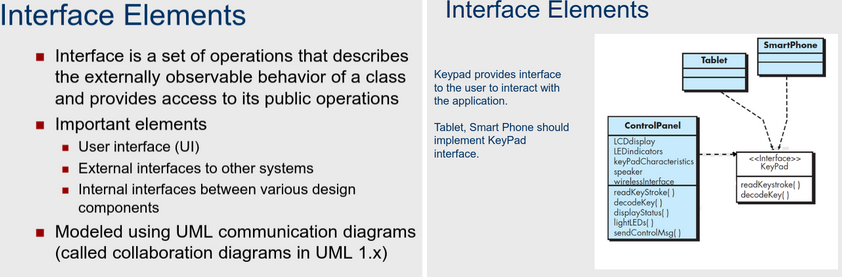
Understand the Interface Design Elements discussed in class
What is software architecture and why is it important?
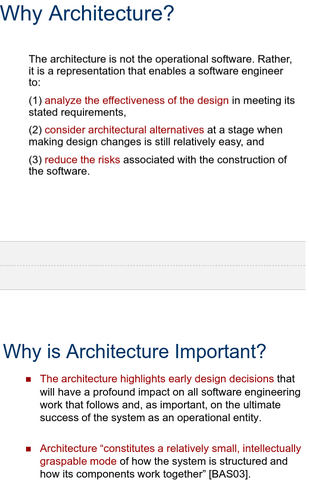
Understand architectural Genres and Styles
6. Read the articles on Canvas: “Criteria for elegant software” and Use case.
- Usability (easy for client)
- Completeness (satisfy reqs)
- Robustness (deal with unexpected/avoid crashes)
- Efficiency (reasonable response time/resource usage)
- Scalability (performs well as problem grows exponentially)
- Readability (for new programmers/team members)
- Reusability (can be reused in different settings/envs)
- Simplicity (of design/implementation)
- Maintainability (easy to find/fix bugs w/o introducing more)
- Extensibility (easy to enhance/restrict by add/removing features w/o breaking)
Info
Lectures
I recommend reviewing each of the previous numbered topics using the lecture notes.
Textbook
I recommend reviewing each of the previous numbered topics from the textbook until you feel comfortable with all of them.
Problem Type
Some of the problem categories that you may expect on the exam could be:
- Theoretical problem set:
- Advantages and disadvantages of a particular concept.
- Limitations of a particular concept.
- From a set of options which one would you choose and why to solve a particular problem.
- Variations/similar exercises to the ones in handout, homework, and textbook examples.
Tips
- Please make use of my office hours.
- It is a good idea to prepare in small study groups (several research done in the past suggests that a study group speeds up the learning process).
- Another thing that might be useful is to first start by reviewing the most recent topic covered and then work your way backwards.Use case.